SameGoal Special Programs
search
SameGoal Special Programs

Parent/Guardian Filters


Company > Blog > Parent/Guardian Filters
download

PowerSchool Parent/Guardian Filters
October 2, 2026

If your district has an active demographics integration with PowerSchool, student and parent demographics are imported into SameGoal nightly from PowerSchool.

By default, all parent/guardian contacts listed in Contact Management in PowerSchool are imported. However, it is possible to limit which contacts pull over. SameGoal has long supported filtering based on guardian flags, but we also recently added two new filter options: Relationship and Original Contact Type.

Steps
To limit parent/guardian contacts imported from PowerSchool:

  1. While logged in to SameGoal as an administrative user, navigate to Settings > District Information.
  2. Scroll down to the PowerSchool section under STUDENT INFORMATION SYSTEM INTEGRATION.
  3. Update filters as needed.
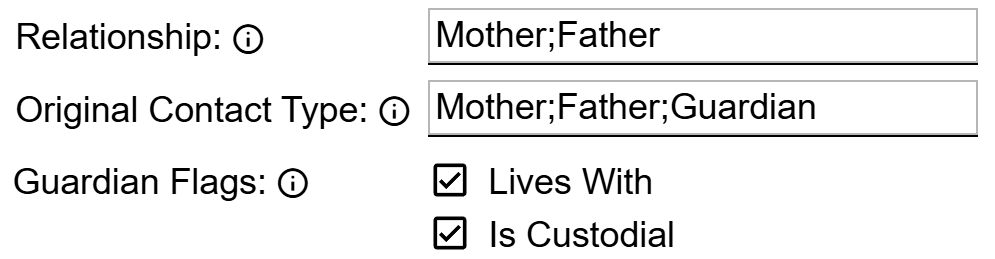
    • Relationship: Enter a semi-colon separated list of allowable values. Only contacts with the specified relationship(s) will be included. For example, Mother;Father.
    • Original Contact Type: Enter a semi-colon separated list of allowable values. Only contacts with the specified contact type(s) will be included. For example, Mother;Father;Guardian.
    • Guardian Flags: Check Lives With to limit contacts to those that have Lives With checked in PowerSchool. Check Is Custodial to limit contacts to those that have Custody checked in PowerSchool.

When the filters are applied, only the applicable contacts will be included in the next nightly demographics integration. Any contact that is already listed on a student's Details tab in SameGoal but not included in the integration will be overwritten (contact information within documents will not be overwritten). This will help to ensure only relevant information is stored in SameGoal and auto-populated in student documents.


info